Mapflow API 指南
如何使用 Mapflow API 运行批量处理
如果您有多个多边形需要处理或更新,使用 Web 或 GIS 用户工具将它们一一上传可能会很无聊。在这种情况下,您最好考虑使用 MapflowMapflow 处理 API。在此示例中,假设我们有一个指示人口稠密地点边界的多边形列表,并且我们希望使用 Mapflow 处理 API 提取“建筑物”等特征。
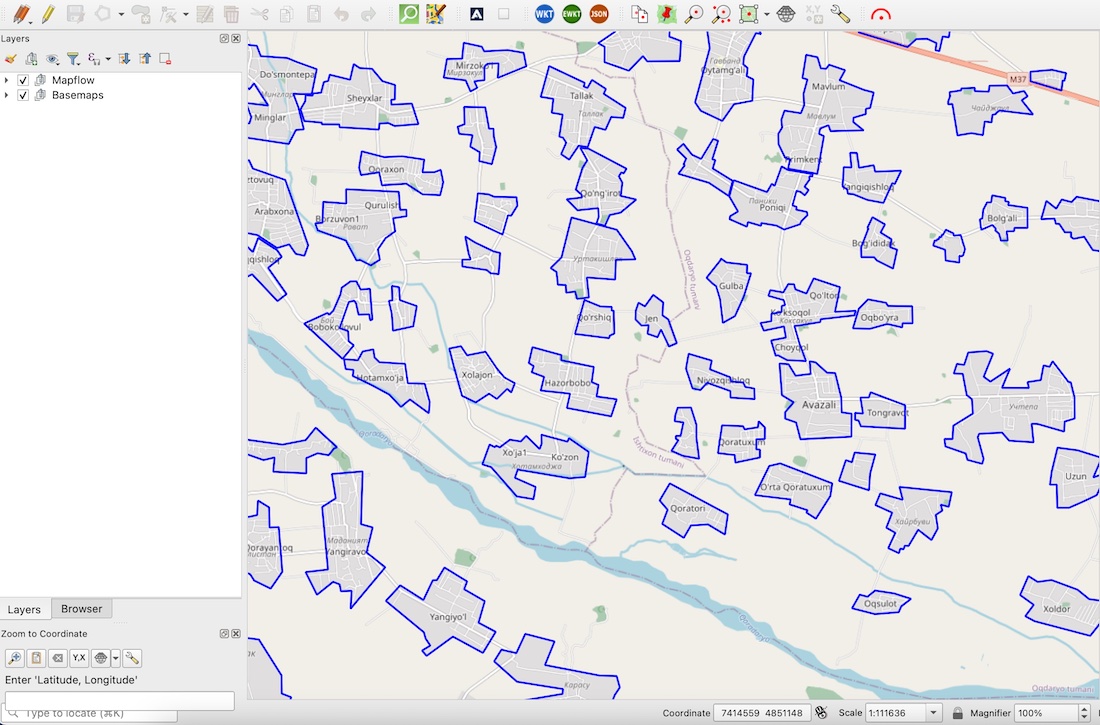
1. To make it more realistic let's download some populated places borders for the sample area in Uzbekistan using Openstreetmap. To do this we can make a query with Overpass Turbo API like this: We can use QuickOSM plugin in QGIS which is very friendly when it comes to downloading a managable volume of data from Openstreetmap.
创建项目(可选)
提示
使用 项目 组织您的处理可能会很有用。为此,请使用以下 API 方法创建新项目。
import requests
import json

url = "https://api.mapflow.ai/rest/projects"
headers = {
    'Content-Type': 'application/json'
    }

payload = json.dumps({
        "name": "My new project"  # Your project name
    })

response = requests.request("POST", url, headers=headers, auth=(username,password), data=payload)

if  response.status_code == 200:
    print(response.text)
else:
    print(f"Request failed")
    print(response.text)
在这里,我们得到包含项目 ID 的响应,我们可以使用它来在该特定项目中创建处理。
响应示例:
    {
    "id": "fb49b97e-51ec-4b31-872f-d1411284de85",
    "name": "My new project",
    ...
}
更多内容请参阅 Projects - API
为处理准备 AOI
让我们将感兴趣的区域及其属性保存为 GeoJSON 文件,因为它是一种简单明了的格式,可在任何应用程序或 GIS 软件中使用。然后我们打开这个文件并创建一个 python 字典来循环遍历所有 GeoJSON 特征,我们将使用这些特征作为 AOI 几何图形来创建处理。像这样:
with open('<path to the file>', 'r') as file:  # Define your GeoJSON file path
geojson_data = json.load(file)

for feature in geojson_data['features']:
    name = feature['properties']['name']   # Extract the "name" property from OSM data
    print(name);
让我们检查一下是否从文件中创建了数据数组,并按名称显示所有功能。在下一步中,我们将使用“name”属性来定义处理。 “名称”是可选的,但之后使用结果会更方便。
运行处理
现在我们准备使用每个 AOI 的几何形状来创建处理。
url = "https://api.mapflow.ai/rest/processings"

for feature in geojson_data['features']:
    name = feature['properties']['name']
    geometry = feature['geometry']
    payload = json.dumps({
        "name": name,
        "projectId": "fb49b97e-51ec-4b31-872f-d1411284de85",  # Here is your project Id to link the processing to the specific project.
        "wdName": "🏠 Buildings",
        "geometry": geometry
    })
    response = requests.request("POST", url, headers=headers, auth=(username,password), data=payload)

    if  response.status_code == 200:
        print(f"Request successful: {name}")
    else:
        print(f"Request failed for feature: {name}")
        print(response.text)
如果一切都正确完成 - 将显示成功创建的处理列表。
使用 Mapflow API 下载所有结果
当所有处理完成后,您可以轻松下载每一项的结果。
如果您的一个处理包含多个 AOI (默认情况下,一个处理中的 AOI 数量限制为 10),您可以运行单个 API 调用来下载结果:
curl --location 'https://api.mapflow.ai/rest/processings/<ID>/result' \
--header 'Authorization: Basic <YOUR API TOKEN>' -O <YOUR PATH TO FILE>.geojson
在进行多个处理的情况下,您可能会发现运行小脚本很有用。
通过处理获取所有“ids”和“name”的列表:
import requests
import json

url = "https://api.mapflow.ai/rest/projects/fb49b97e-51ec-4b31-872f-d1411284de85/processings"

response = requests.request("GET", url, auth=(username,password))

json_data = response.json()

values = []
for item in json_data:
    if "id" in item and "name" in item:
        values.append((item["id"], item["name"]))

if  response.status_code == 200:
    for id, name in values:
        print(f"{id}, {name}")
else:
    print(response.text)
响应示例:
5f748822-c94a-4233-ae1e-7622973bf9b5, Бой
87f258e6-c1ce-4deb-8155-ccd6b21ac237, Авазли
1e24c0e5-9b6f-4a26-9970-82dfb1f67807, Avazali
0316606a-4c04-4196-bdab-6495af4bb7b0, Авлиятепа
38435f06-6b85-420e-86f8-3ebef4755480, Акбуйра
33ffec93-ef2b-4ead-a51e-30cad1bcb71d, Аксулат
c8f73cf5-8a44-4c36-8b2e-49b27f7f5da5, Актепа
6eaca828-41ec-4ce5-aea4-b9f039211bbe, Арабхана
...
保存所有列出的处理的结果:
output_json = '<path to the folder>' # Define local folder to save files

for id, name in values:
    response = requests.request("GET", url + id + '/result', headers=headers)

    if  response.status_code == 200:
        with open(output_json_file + name + '.geojson', 'w') as geojson:
            geojson.write(response.text)
            print(f"File saved")
    else:
        print(f"Request failed")
        print(response.text)